18. Popovers
The Gtk.Popover is a seperate window used for displaying additional
information and are often used as a part of button menus and context menus.
Their uses are similar to those of dialog windows with the advantage of being less
disruptive and having a connection with the widget the popover is pointing to.
Popovers have are visually connected to a related widget with a small triangle.
ApPopover can be created with Gtk.Popover; for opening the popover use
Gtk.Widget.show_all().
18.1. Custom Popover
A widget can be added to a popover using the Gtk.Container.add().
18.1.1. Example
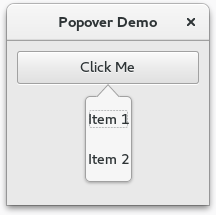
1 2 3 4 5 6 7 8 9 10 11 12 13 14 15 16 17 18 19 20 21 22 23 24 25 26 27 28 29 30 31 32 33 34 35 36 37 | import gi
gi.require_version('Gtk', '3.0')
from gi.repository import Gtk
class PopoverWindow(Gtk.Window):
def __init__(self):
Gtk.Window.__init__(self, title="Popover Demo")
self.set_border_width(10)
outerbox = Gtk.Box(spacing=6, orientation=Gtk.Orientation.VERTICAL)
self.add(outerbox)
button = Gtk.Button.new_with_label("Click Me")
button.connect("clicked", self.on_click_me_clicked)
outerbox.pack_start(button, False, True, 0)
self.popover = Gtk.Popover()
vbox = Gtk.Box(orientation=Gtk.Orientation.VERTICAL)
vbox.pack_start(Gtk.ModelButton("Item 1"), False, True, 10)
vbox.pack_start(Gtk.Label("Item 2"), False, True, 10)
self.popover.add(vbox)
self.popover.set_position(Gtk.PositionType.BOTTOM)
def on_click_me_clicked(self, button):
self.popover.set_relative_to(button)
self.popover.show_all()
self.popover.popup()
def on_open_clicked(self, button):
print("\"Open\" button was clicked")
win = PopoverWindow()
win.connect("destroy", Gtk.main_quit)
win.show_all()
Gtk.main()
|
18.2. Menu Popover
A popover can be created from a Gio.MenuModel using
Gtk.Popover.new_from_model() and can be changed after creation with
Gtk.Popover.bind_model().
18.2.1. Example
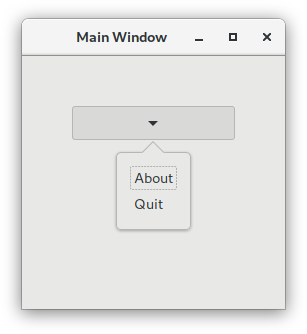
import sys

import gi
gi.require_version('Gtk', '3.0')
from gi.repository import Gio, Gtk

# This would typically be its own file
MENU_XML = """
<?xml version="1.0" encoding="UTF-8"?>
<interface>
  <menu id="app-menu">
    <section>
        <item>
            <attribute name="label">About</attribute>
            <attribute name="action">app.about</attribute>
        </item>
        <item>
            <attribute name="label">Quit</attribute>
            <attribute name="action">app.quit</attribute>
        </item>
    </section>
  </menu>
</interface>
"""


class AppWindow(Gtk.ApplicationWindow):
    def __init__(self, *args, **kwargs):
        super().__init__(*args, **kwargs)

        outerbox = Gtk.Box(spacing=6, orientation=Gtk.Orientation.VERTICAL)
        self.add(outerbox)
        outerbox.show()

        builder = Gtk.Builder.new_from_string(MENU_XML, -1)
        menu = builder.get_object("app-menu")

        button = Gtk.MenuButton.new()
        popover = Gtk.Popover.new_from_model(button, menu)
        button.set_popover(popover)

        outerbox.pack_start(button, False, True, 0)
        button.show()
        self.set_border_width(50)


class Application(Gtk.Application):
    def __init__(self, *args, **kwargs):
        super().__init__(*args, application_id="org.example.myapp", **kwargs)
        self.window = None

    def do_startup(self):
        Gtk.Application.do_startup(self)

        action = Gio.SimpleAction.new("about", None)
        action.connect("activate", self.on_about)
        self.add_action(action)

        action = Gio.SimpleAction.new("quit", None)
        action.connect("activate", self.on_quit)
        self.add_action(action)

    def do_activate(self):
        # We only allow a single window and raise any existing ones
        if not self.window:
            # Windows are associated with the application
            # when the last one is closed the application shuts down
            self.window = AppWindow(application=self, title="Main Window")

        self.window.present()

    def on_about(self, action, param):
        about_dialog = Gtk.AboutDialog(transient_for=self.window, modal=True)
        about_dialog.present()

    def on_quit(self, action, param):
        self.quit()


if __name__ == "__main__":
    app = Application()
    app.run(sys.argv)