11. Spinner
The Gtk.Spinner displays an icon-size spinning animation.
It is often used as an alternative to a GtkProgressBar
for displaying indefinite activity, instead of actual progress.
To start the animation, use Gtk.Spinner.start(),
to stop it use Gtk.Spinner.stop().
11.1. Example
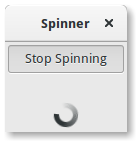
1 2 3 4 5 6 7 8 9 10 11 12 13 14 15 16 17 18 19 20 21 22 23 24 25 26 27 28 29 30 31 32 33 34 35 36 37 38 39 40 | import gi
gi.require_version('Gtk', '3.0')
from gi.repository import Gtk
class SpinnerAnimation(Gtk.Window):
def __init__(self):
Gtk.Window.__init__(self, title="Spinner")
self.set_border_width(3)
self.connect("destroy", Gtk.main_quit)
self.button = Gtk.ToggleButton("Start Spinning")
self.button.connect("toggled", self.on_button_toggled)
self.button.set_active(False)
self.spinner = Gtk.Spinner()
self.table = Gtk.Table(3, 2, True)
self.table.attach(self.button, 0, 2, 0, 1)
self.table.attach(self.spinner, 0, 2, 2, 3)
self.add(self.table)
self.show_all()
def on_button_toggled(self, button):
if button.get_active():
self.spinner.start()
self.button.set_label("Stop Spinning")
else:
self.spinner.stop()
self.button.set_label("Start Spinning")
myspinner = SpinnerAnimation()
Gtk.main()
|